 CanaryVolt
Your sharpest self, on every call.
CanaryVolt is a real-time AI assistant and note-taker for professional calls and meetings. It listens to the call, offers timely suggestions in a panel only you see, and hands you the notes the moment you hang up.
For macOS 14.4 or later. Account access is arranged with the founder.
Four quiet steps.
-
Start a session
Pick a mode and start. Your notes are private to you; telling participants is your call, as with any note-taker.
-
It listens and transcribes
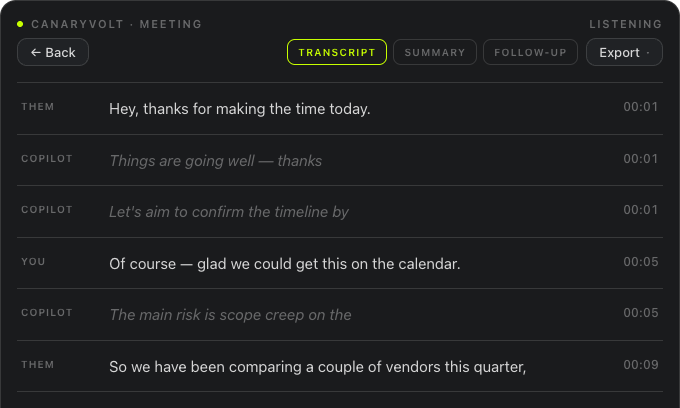
Audio is transcribed into a live transcript displayed on your machine, with speaker labels for you and them.
-
Suggestions, in the moment
Mode-aware suggestions appear in your on-screen panel while the conversation is happening.
-
End with clean notes
A structured summary is ready when the call ends, and you can request a follow-up draft.
A playbook for the conversation you're in.
Sales Call
Listens for objections, commitments, and next-step openings — and nudges you toward the discovery question you'd wish you had asked.
Meeting
Tracks topics, decisions, and action items as they happen, so the recap writes itself.
More scenarios are on the way — and custom modes let you write your own playbook.
Hang up with the paperwork done.
- Full transcript with speaker labels
- Structured summary, shaped by the mode you ran
- A follow-up email draft, available when you request it
- Export to PDF, Word, or Markdown
Nothing hidden, nothing joins.
CanaryVolt runs on your machine, for you. No bot joins, nothing appears in the participant list, and nothing is sent to anyone else on the call.
-
Your notes, your call
Recording laws vary by place. As with any note-taker, telling participants is your responsibility, and our Terms say so. The recording guide has the practical basics.
-
Ephemeral on your Mac by default
Audio is not written to disk. The transcript and summary stay temporarily in app memory for review, then clear at the next session or app exit. Speech and AI provider processing and retention are disclosed in the Privacy Policy.
-
No voiceprints. Ever.
CanaryVolt never builds a biometric profile of anyone's voice.
-
No bot joins your meeting
Nothing dials in, nothing shows up in the participant list. CanaryVolt runs on your machine, for you.
-
API keys never live on your device
Model access runs through CanaryVolt's secure gateway — provider keys never touch your machine.
Mac today. iOS close behind.
CanaryVolt for macOS
The full app for calls and meetings on Apple Silicon and Intel Macs.
CanaryVolt for iOS
A companion for in-person conversations, away from the desk. Not on the App Store yet; email hello@canaryvolt.com for a build.
One account covers both.
Put it on your Mac.
Start a session and see what it does on your next call. Pilot access is arranged with the founder while prices and allowances are being tested. Plan allowances are on the terms page.
Plans are being prepared
Final prices and allowances follow measured usage and quality testing.
Review your plan, allowance and monthly or annual renewal before payment. Account access changes only after verified billing.
The Mac app is not on a public download yet. We are setting up the first users by hand while the signed build is finished — email us and a person will get back to you.